Ripieno
Open source under the MIT License.
ripieno — in a concerto grosso, the full ensemble, as against the soloists. Several parts, sounding together, each still its own line.
A shared workspace in your editor where several people and several AI agents work on one codebase at once — self-hosted, with each person bringing their own agent through the supported local CLI or OpenAI-compatible provider paths.
Everything is attributed to a named actor: a specific agent belonging to a specific person, rather than whoever's machine happened to run it.

Three people, three agents, one conversation. Note the last two blocks: the
action log records that Mira's coder wrote to room.ts on @mellery while
Kate's agent read a file on @swhitfield — the machine is part of the record,
not an assumption. And the approval card is how a write reaches somebody
else's disk at all: it does not, until they say so.
The naive version of this is a shared login, which gives the agent one anonymous view of a team: it cannot tell agreement from disagreement, whose preferences to honour, or whose filesystem the next write lands on. Here every message the agent receives carries its author as structure the relay maintains, and every workspace action runs on the asking member's own machine under their own permissions.
This project does not operate a hosted service. A relay sees every message and routes every tool call, so the current model is deliberately self-hosted. You run your own, or you run none at all — solo mode needs no separately deployed relay, account or token. See docs/self-hosting.md.
Two agents belonging to two different people can write to the same repository
concurrently, and git log names each of them correctly:
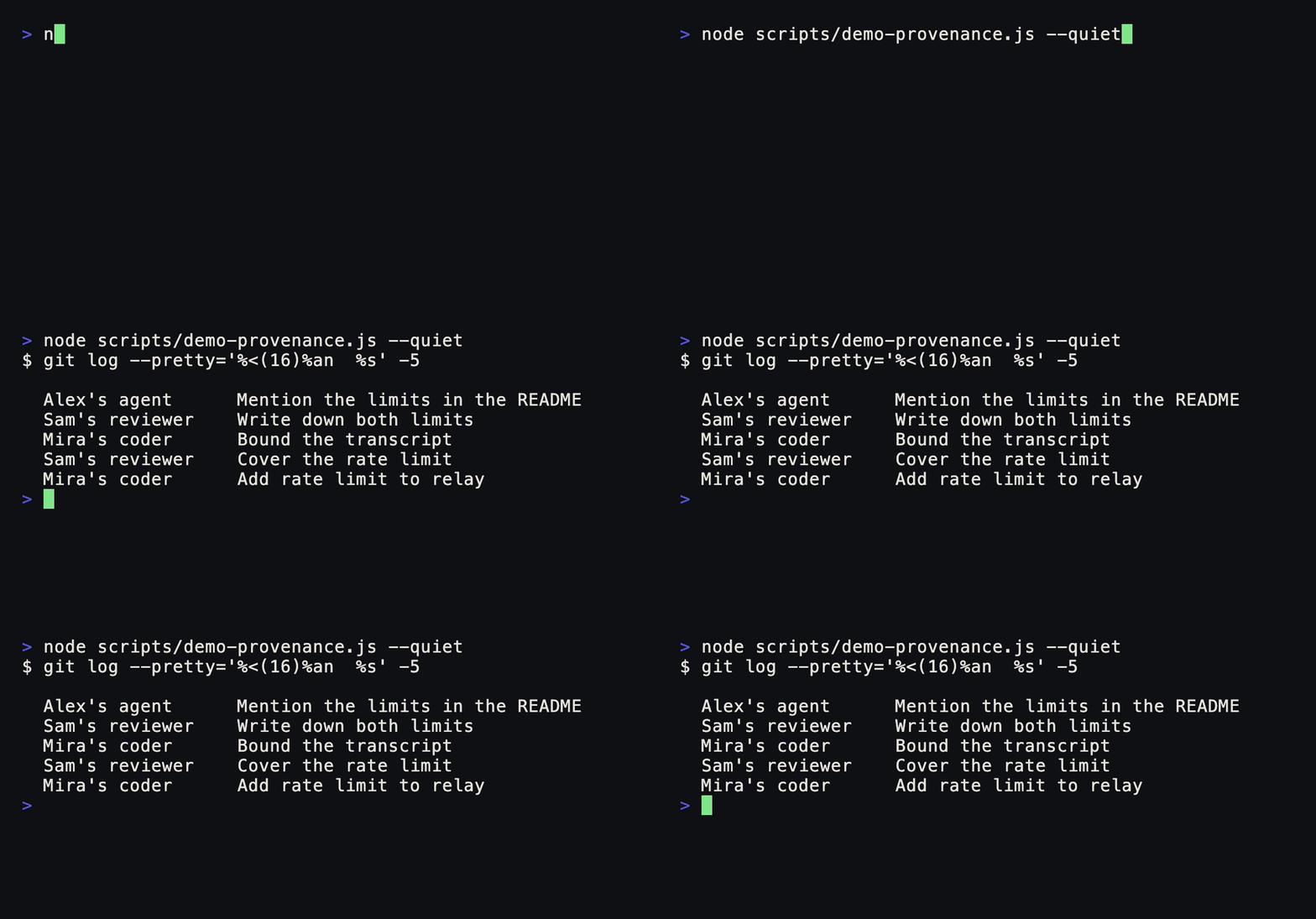
$ npm run demo:provenance

$ git log --pretty='%<(16)%an  %s' -5

  Alex's agent      Mention the limits in the README
  Sam's reviewer    Write down both limits
  Mira's coder      Bound the transcript
  Sam's reviewer    Cover the rate limit
  Mira's coder      Add rate limit to relay
That column normally holds one name — whoever's machine ran the commit. It is
real output: the demo runs the container's own code against a real repository,
writing concurrently rather than in turn, because git serialises on
.git/index.lock and losing that race is how five writes in six once vanished.
Status: what's real
Honest, because an unknown repository has no other way to earn it.
| Works, used | Solo mode, invite links, rooms over a deployed relay, several agents per member across supported providers, remote workspace tools, approval-gated side effects, action log, per-agent usage, verified GitHub identity, owner/member/viewer roles, and room history that survives a redeploy when the relay has persistent storage |
| Built and tested, never deployed | The shared-workspace container (packages/workspace-host) — including real git integration tests, and it has never run anywhere but a test |
| Not shipped | Hosted mode. Built against the same driver interface, compiles, unit tests pass — and it has never run against a live Managed Agents session, so it is not shipped and not described here as a feature |
npm test builds the monorepo and runs every package that currently has a test
script. Exact totals are intentionally left to the test runner so this page
does not go stale as coverage changes. Security fixes found by adversarial
review have regression coverage in the affected packages.
The more useful thing to say is where tests did not help. Several bugs were
found only by two people using it, and several more by an outside reading of the
whole repo — a role menu whose when clause named a view that does not exist, so
the feature rendered for nobody; an empty activationEvents, so invite links
only worked if the extension was already awake; a permission setting that
promised to ask before writes and mapped to a mode that pre-approves them. None
of those are reachable from a unit test of the code behind them, and all three
had passing tests underneath. The newest tests go after exactly that: one runs a
real relay, a real agent host and a real subprocess and asserts on the prompt the
agent was handed (it immediately found that every CLI agent had been silently
running Claude Code); another checks the extension manifest against itself.
Coordinate the work
Ripieno includes a live team board, human-owned work claims, shared plans and assigned tasks. Brain keeps searchable, attributed memories and code discussions. Select shared code to create an anchored record; changed files are detected before navigating an old anchor. Handoff recovery makes interrupted transfers visible and keeps retries explicit.
These features are included in the extension. A self-hosted shared relay must also be updated to support plans and claims. Task status and work claims express human coordination; they do not automatically launch agents or prove that a change has been reviewed.
See the extension guide for everyday use and the release guide for building a versioned preview.
Try it in one minute, alone
Nothing to deploy, no account, no token.
npm run setup
That installs dependencies, builds, packages the extension and installs it into
your editor — VS Code, Insiders, Cursor, Windsurf, Antigravity, VSCodium or
Positron, found on PATH or inside the application bundle, because the code
command is not on PATH by default on macOS and most people never add it.
Reload the window, open a project folder, then run Ripieno: Start a Room for
Yourself. Leave ripieno.relayUrl empty and the extension runs a relay on this
machine. Open Ripieno in the Activity Bar for Chat, Work, Brain and
Agents, or choose Open workspace for the full view. Existing rooms can
be opened with Ripieno: Join Room.
If no editor is found, setup prints the absolute path to the .vsix and the two
clicks that install it by hand.
It is deliberately the same relay a team shares, not a reduced imitation — same rooms, same attributed transcript, same tool routing, same action log, and history that survives a reload. Solo is where people form their opinion of the product, and a cut-down version would teach them the wrong thing about it.
Choose Add agent… in the Rooms & Agents tree. Ripieno asks which account should power it, putting a detected local provider first. It generates the name, keeps the brief optional, uses the provider's default model and starts at the safest boundary Ripieno can actually enforce. Name, brief, model, response mode, workspace folder and permissions remain individually editable from the gear.
Use your ChatGPT account
Choose ChatGPT / Codex — the recommended option. Ripieno checks that Codex
CLI is installed and signed in; if it is not, it opens Codex's own trusted
sign-in flow in a terminal and continues after the login succeeds. Ripieno never
sees or stores your ChatGPT credentials. Once the account is ready, the agent
joins immediately with a normal name (agent, then agent 2), the current
workspace, the provider's default model, no special brief and Read project
access. An existing detached agent gets a single Attach agent step instead
of another setup wizard.
Use the gear beside any agent to change its name, add or remove a brief, point it at another folder, choose a model where the provider supports it, choose automatic replies or only-when-named response mode, or change permissions. The same menu deletes an agent after confirmation and forgets its saved session and credentials. The plain-language boundaries describe concrete enforcement: Conversation only for API chat agents, Read project for sandboxed Codex, Ask before changes for Claude's approval bridge, and Trusted workspace for Codex workspace-write. A separately confirmed Full computer access option stays explicitly named because it removes the workspace boundary. The Codex boundaries follow OpenAI's sandbox model: workspace write is the normal local boundary, while full access removes it.
This creates a new coding agent; it cannot import a ChatGPT web conversation or
custom GPT. Install Codex CLI and run codex login to sign in with ChatGPT, or
use an API key. API-key usage is billed separately through the OpenAI Platform
at API rates rather than from ChatGPT plan credits. See
OpenAI's Codex authentication guide.
Room commands
Type / in the room composer to see the commands Ripieno handles locally:
/modelopens a provider-aware model picker for one agent./model <model> [agent]applies an exact model ID, such as/model gpt-5.6-terra agent 2;/model default [agent]returns to the provider default./agentsshows each agent's provider, model and connection state./contextpoints to the durable shared Context tab, where people can add, accept, supersede and archive attributed room memory./attach [agent]and/detach [agent]act on one agent, using a picker when the name is omitted.
Codex and Gemini receive the selected model through their CLI model option; Claude and OpenAI-compatible agents receive it through their existing provider configuration. Custom CLI agents keep model selection in their own arguments.
Adding people
Set ripieno.relayUrl to a relay you can both reach, then Copy Invite Link. The
link carries the relay, the room and the token; clicking it confirms what is
being joined before anything happens, and the token goes to the editor's
SecretStorage rather than settings.json — settings are one git add . from
being published.
Run a relay anywhere Node runs:
RIPIENO_HOST=0.0.0.0 RIPIENO_TOKEN=$(openssl rand -hex 24) RIPIENO_DATA_DIR=./data npm start
RIPIENO_TOKEN gates who may reach it. RIPIENO_DATA_DIR is where room history lives —
without it a restart empties every room. Put TLS in front and give members its
wss:// URL; remote plaintext connections are refused so credentials cannot
cross the network unencrypted. The standalone relay verifies GitHub identities
by default even if it binds to loopback behind a proxy;
RIPIENO_REQUIRE_GITHUB=0 is an explicit opt-out for a trusted private
deployment. The extension's embedded solo relay remains tokenless and local.
Bring your own agent
Each member attaches their own agent, running on their own machine, and pays for it under that provider's terms. Ripieno is free to use, modify and redistribute under the MIT License, including for commercial use. Provider subscriptions, API charges and hosting costs are separate.
| You have | Attach | Cost | Can touch files |
|---|---|---|---|
| A Claude Code subscription | Claude Code | already paid for | yes |
| A ChatGPT or Google plan | Codex or Gemini CLI | already paid for | yes |
| An API key | any OpenAI-compatible endpoint — Grok, Kimi, DeepSeek, Together, Groq | per token, billed by them | no |
| A GPU and no budget | a local Ollama model | free | no |
| Something else entirely | any CLI agent, with its own flags | yours | yes |
Two people in one room need not have made the same choice, which is the point: a subscription and an API key sit side by side and neither knows about the other.
That last column is not a footnote. Capability differs and the room says so rather than implying otherwise: a Claude Code agent reads and writes files and runs commands; an API-key agent can only talk. Presenting both as "an agent" without distinction would let somebody ask Grok to fix a file and get a confident answer while nothing happened.
The API-key path is tested over a real local HTTP/SSE exchange — request shape, auth, history, token accounting, live response drafts and failure cancellation — but has not been run against every named vendor, so treat vendor quirks as unproven.
Usage is per agent, and in BYO it is turns and tokens, never a price. Claude Code reports a dollar figure on a subscription too, where it is what those tokens would have cost on the API and nobody is billed a penny of it — and next to a colleague's agent on a different plan, the two figures do not mean the same thing.
An agent can also join over MCP instead. See the
MCP setup guide before copying .mcp.json.example: remote relays
need a room token and verified relays additionally need a GitHub token, and MCP
client configuration commonly stores those values as plain text. That path gets
twelve tools (room_read, room_post, room_roster, room_actions,
context_read, context_add and six workspace_*). Agent context additions
are proposals until a person accepts them in the Context tab.
The room also has an Agents tab for live observable activity, a durable Context tab shared by every participant, and bounded ephemeral reply bubbles while Claude or an OpenAI-compatible agent writes. The relay attributes those bubbles to the exact agent and replaces each with one final transcript entry; hidden reasoning and provider diagnostics are never draft channels.
Choose Ripieno: Open Full Room Panel (also available from the Room view title) for an editor-sized overview and one owner-labelled tab per exact agent. It brings together the agent's observable current task, related goals and handoffs, working set, durable Work entries, reported usage and permissions. Status filters and follow mode are local UI preferences. Only your own local provider configuration is shown, in a visibly private section; another owner's settings are never relayed or guessed. When an agent reports a location in the room's one shared workspace, the location opens the host's live document and its active line/range is marked in the member's colour in any open editor. Remote documents use Ripieno's read-only filesystem. Private-workspace paths are withheld by default; an owner can explicitly opt in to sharing them, and only that owner's editor maps them back to local files. See the live collaboration plan for the shipped foundation, privacy boundaries and staged path to editor presence and live proposed diffs.
The shared workspace
An agent normally works in its owner's own directory, and two members' copies of a project may genuinely differ — which is useful, and is why an agent can read the same file from two machines and tell you what changed.
Choosing Host / Release the Shared Workspace now requires a real local
folder. If this editor has none open, Ripieno can create
Documents/Ripieno/<room-name> (without adopting an existing directory) or let
you choose a folder, adds it to the window, and only then claims the host lease.
Closing that exact folder releases the lease immediately. The full Room panel
labels the result honestly as Saved locally, Live from @host, or
Workspace offline, and says when no durable checkpoint exists; local files
are not described as GitHub-synced.
Point an agent at the room's workspace instead and something different happens: it acts on whichever machine is hosting, and so does everyone else's.
One filesystem, not many copies. There is nothing to replicate and nothing to merge, because there is only ever one of it. Mount it in your own explorer and you get a live read-only view of the host's actual disk, fetched on demand rather than copied to yours.
Invalidated after a short debounce. The host watches its workspace and
publishes changes after a 400ms debounce, ignoring the churn nobody browses —
node_modules, .git, build output. Network and editor scheduling mean this is
not an end-to-end half-second guarantee. The relay checks the sender really is
the host before rebroadcasting, so a member cannot invalidate everyone else's
view of a workspace that is not theirs. Every member drops the stale paths and
re-reads on next access.
Member-hosted writes stop at a person. An agent's write raises a diff on the member host's machine naming the agent that asked, and nothing lands until they accept. It then appears in the room's action log, so other agents can see what has been done instead of redoing it. The headless container has no person to prompt; it uses its explicit command/write policy instead.
The container (packages/workspace-host) is the version that outlives everyone:
it clones a git repository, serves the same tool calls, and commits each write as
the agent that made it, so provenance ends up in git log rather than only in
the room. Built and tested; not deployed anywhere yet. Run it locally with
npm run build:workspace && npm run start:workspace.
Layout
| Package | What it is |
|---|---|
packages/protocol |
The WebSocket contract. Pure types and helpers, no dependencies |
packages/relay |
The server: membership, transcript, provenance, tool routing, persistence, identity, roles |
packages/relay-client |
The WebSocket client both the extension and the container use |
packages/workspace-core |
The workspace tools and the path-confinement boundary, shared by the editor and the container |
packages/workspace-host |
The container that can host a room's workspace |
packages/extension |
VS Code: the room UI, agent hosting, approvals, the shared-workspace view |
packages/mcp |
An MCP server, so an agent can join a room without the extension |
The relay splits into a room core — membership, transcript, provenance,
addressing — and a driver that turns room events into agent turns. The core
never assumes it owns the agent loop. ByoDriver coordinates each member's own
agent; a HostedDriver running one shared session was built against the same
interface, which is the evidence the seam is real rather than hypothetical.
Security boundaries
- Path confinement is one implementation, in
workspace-core, used by both the editor and the container.resolveSafePathresolves the deepest existing ancestor before deciding, so a symlinked parent cannot be used to create a file outside the workspace;confineToWorkspaceresolves each result individually rather than trusting its parent directory. Both of those started out subtly wrong and are now covered by tests written from the exploit. - Only the member a tool call was sent to may answer it. Without that, any member could forge the contents of somebody else's workspace into an agent's context. Request ids are minted by the relay, never taken from a client — two clients each counting from zero used to collide and deliver one agent's file to another.
- Member-hosted remote writes and commands are approved by that member, and the approval names the agent that asked and whose workspace it will touch. The unattended container uses an operator-defined allowlist rather than a human prompt. Local-agent permissions are stored per agent and can be changed from its gear; full access requires an explicit warning confirmation.
- Roles are enforced in the relay, not the UI. Hiding a button is
presentation; anyone can send the message the button would have sent. They only
mean something with
RIPIENO_REQUIRE_GITHUB, because a handle is otherwise self-asserted — enforced regardless, so that turning verification on is sufficient. - Identity fails closed. If GitHub cannot be reached, joins are refused rather than trusted; "cannot check" is the state the feature exists to replace.
- Messages are bounded — 1 MB frames, 32k characters — because the transcript is held in memory and rebroadcast to everyone, so an unbounded message is everyone's problem rather than the sender's.
- The webview runs under
default-src 'none'with a nonced script and renders all agent text escape-first.
The container's command allowlist is a trust decision, not a sandbox
RIPIENO_ALLOWED_COMMANDS is empty by default and a container with no allowlist runs
nothing. If you set one, understand what you are choosing.
An agent can write project files. So allowlisting npm test means an agent can
write a package.json whose test script is anything at all, and then legitimately
ask for npm test. The escape is through the allowed program's own
configuration, not through the command string, so no amount of blocking shell
metacharacters changes it.
Allowlisting a build tool means trusting everyone in the room with code
execution in that container. Often a reasonable choice; not one to make by
accident. What the container does instead is make the prize small: RIPIENO_*
variables are stripped from every command's environment in both hosts, and in the
container provider keys and anything ending in TOKEN, SECRET or PASSWORD go
too — nobody is watching there, and the room could simply ask an agent to run
env. On a member's own machine they are kept: a human approved that command,
and stripping their environment would break ordinary work to prevent something
they were present for.
Tests
npm test          # builds first, then runs every package that has a test script
npm run typecheck
The rules that are expensive to get wrong are pure functions with no I/O —
roomCore.ts (provenance envelope, addressing, event dedupe, the idle gate),
protocol/describeMembers (what an agent is told about who is in the room) and
workspace-core/paths.ts (the confinement boundary) — so they are tested without
a socket or a credential.
What that misses is everything the pieces do together, which is where the bugs
two real users hit actually lived. So extension/test/agentHost.test.js starts a
relay, attaches real agent hosts to it, and puts a script in place of the model
that writes down the prompt it was given. It is the only way to assert that an
agent was told who is in the room — and it immediately found that selecting a
CLI provider had been quietly running Claude Code instead.
Not done, on purpose
- The container is not deployed. It is built and tested; deploying it is infrastructure work that produces nothing a reader can see.
- The extension is a 0.0.x Preview and is not yet published to a marketplace.
Build the
.vsixand install it. A public release still requires the Marketplace publisher/release steps; the manifest version alone is not a claim that a release exists. - Hosted mode is not shipped, because it has never run against a live session.
- Agents stop talking to each other quickly. One may name another and get an answer — report, check, respond — and then it stops until a person speaks. The relay counts, per agent, how many times that agent has spoken since a human last did; nothing in a message influences the number, so with N agents the worst case is 2N messages whatever they say to each other.
Built by Ivan Hart (@ijmh2). Open source under the MIT License. Third-party components retain their own licences; see the bundled dependency notices below.
Before using a shared room, read the security model and privacy and data-flow disclosure. Help and issue-reporting guidance is in SUPPORT.md; bundled dependency licenses are in packages/extension/THIRD_PARTY_NOTICES.md.
The names in the tests and screenshots — Mira Ellery, Sam Whitfield, Kate
Nakamura, Alex — are fictional. Addressing is decided by matching a first name
against a role word against an @handle, and those three have to stay distinct
for the tests to mean anything, so the fixtures use people who do not exist.